


Los Angeles Chargers
4.4110.00 Reviews
App Specs
- Version
- 6.3.9
- Updated On
- License
- Free
- Downloads
- 10,000+
- Developer
- Los Angeles Chargers Football Company, LLC
- Categories
- Sports
- Platform
- Android
Screenshots



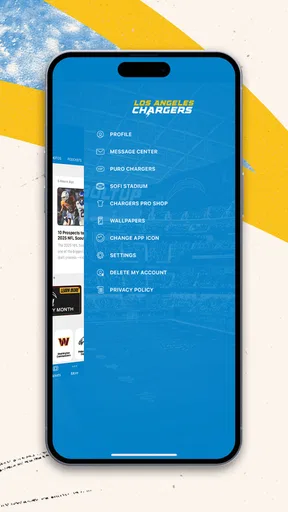
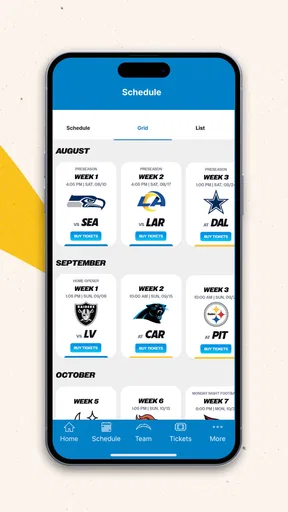


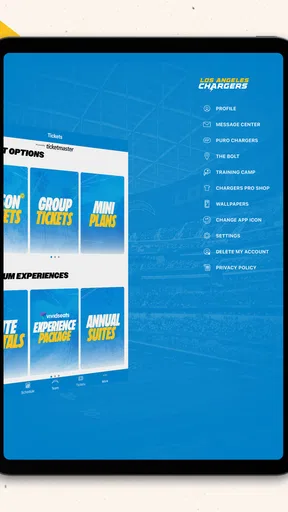
 Analysis by AppCompare
I installed Los Angeles Chargers to see whether it could become a useful part of a fan’s weekly routine rather than just another team-branded app sitting on the phone. My starting point was simple: I wanted one place to check what was happening around the Chargers, find game-related information, and decide whether the app was more convenient than jumping between a browser, social networks, sports apps, and news alerts. After using it with that practical goal, I found a focused sports companion that makes the most sense for supporters who want Chargers-specific information without sorting through a wider league feed.
The app is free, aimed at Everyone, and comes from Los Angeles Chargers Football Company, LLC. It is available for Android and iOS, with a current version listed as 6.3.9 and a minimum operating-system requirement of version 10. Those details matter because this is not an experimental side project or a generic football reader; it is the official mobile home for one team’s news and game information. That narrow purpose is also its main strength and its first limitation.
From a quick check to a complete game-day routine
I like to think of a team app as something that should earn a spot on my phone through quick, useful checks—not by demanding a long visit every time. In this section, I look at how the Chargers app fits into that rhythm, from a brief glance at team news to a more deliberate game-day routine. The next step is considering how well it holds up when those checks become more frequent.
Starting with the question that brought me to the app
Most people will not open a team app because they want to explore every menu. They open it with a question: Is there new Chargers news? When is the next game? What information do I need before kickoff? I judged the app against those moments. The store summary describes access to the latest news and game info, and that is the right way to understand its role. It is not trying to replace every sports service on your phone. It is designed to reduce the distance between a fan and Chargers-specific updates.
That focus immediately makes it more useful than a general sports app when I only care about this team. In a broad application, Chargers items can be mixed with league headlines, scores from other sports, and unrelated notifications. Here, the starting condition is cleaner: I am already in the team’s environment, so the information I want should require less filtering. The trade-off is that anyone following several teams, leagues, or sports may still need another app for the bigger picture.
The audience is easy to identify. I would recommend it to a regular Chargers supporter who checks team news during the week, follows game information closely, or wants a direct team-centered experience. It is also a sensible choice for a casual fan who does not need deep statistical analysis but wants a dependable place to begin. I would be less enthusiastic about it for someone looking for a complete sports dashboard, fantasy tools, betting analysis, or broad historical research. Those needs belong to more specialized services.
Step one: opening the app with a purpose
My preferred way to use it is to treat the opening screen as a launch point rather than browsing aimlessly. I first look for the newest team information, then move toward the game-related area when I need schedule or matchup context. This order prevents a common mistake with official apps: spending time scrolling through visual content before answering the practical question that brought you there.
Worth Reading Before You Choose

Baby Panda World Brings Quick Play to Modern Phones, but Its Game Library Feels Busy

ESPN’s Live Game View Makes Following Close Games Easier

QuizzLand Review: A Good Fit for Short Trivia Breaks, Not Every Player

Basketball Stars: Multiplayer Is Fast, but Can It Recover When Matches Go Wrong?

WEBTOON Turns Phone Updates Into a Better Reading Routine

Link to Windows Runs on Shared Habits, Not Social Feeds
For a weekday check, the workflow is quick. I open the app, scan the newest items, and decide whether anything affects my interest in the next game. If there is nothing urgent, I leave. That sounds basic, but it is an important test. A fan app earns its place by making short visits worthwhile. The Chargers app is at its best when I use it in these small bursts instead of expecting a long-form sports portal.
For a game-day check, I use a slightly different order. I begin with the relevant game information, confirm the event I am following, and then read team news for context. This is more efficient than starting with general articles and hoping the information I need appears along the way. The most useful habit is to decide what you need before opening the app: news, game details, or a quick team check. That simple choice reduces the feeling of wandering through a branded content hub.
Step two: moving from news to game information
The handoff between news and game information is where a team app should prove its value. News gives me the reason to care about the next event; game information gives that interest a practical destination. In this app, I see the two functions as complementary rather than competing. I can read what is happening around the Chargers and then shift my attention to the game itself without changing to a league-wide service.
This is particularly helpful when I am preparing for a weekend watch. I might check team news while drinking coffee, return later to confirm the game details, and use the app again shortly before watching. The app supports that repeated, lightweight workflow better than a single long session. I do not need to remember which browser tab contained the team page, and I am less likely to lose the thread among unrelated headlines.
There is a subtle trade-off here. A dedicated team environment feels clearer because it removes distractions, but it can also remove useful comparison. If I want to see how the Chargers’ situation fits into the wider standings, compare several games at once, or follow another team simultaneously, a general sports app is usually more efficient. I would keep both if those broader questions are part of my routine.
Step three: using the app before, during, and after a game
Before a game, I use the app as a preparation tool. I check the latest information first, then review the game-related details so I know I am looking at the correct event. This is a good moment for a phone-based team app because I may be away from a computer, commuting, or getting ready to watch with other people. The smaller screen is not a serious problem for a quick confirmation, and the focused content keeps the task manageable.
During a game, my expectations are more cautious. I want the app to help me orient myself, but I would not make it my only source for every live detail. A specialist live-score service may be better for rapid play-by-play, league-wide comparisons, or highly detailed statistical tracking. The Chargers app is more naturally suited to staying connected with the team’s own information than to acting as a full broadcast companion.
After a game, the workflow changes again. I return for the team’s follow-up coverage and use the app to stay within the Chargers’ perspective. That is valuable when I want a focused recap rather than a noisy stream of reactions from across the internet. It also gives the app a role beyond the few minutes before kickoff: it can become a simple checkpoint after the event, especially for fans who prefer official team coverage.
Where the handoffs feel smooth
The smoothest handoff is from a general team update to a game-related check. Both tasks belong to the same subject, so I do not have to mentally reset or filter out unrelated material. This is the app’s clearest advantage over a generic news reader. The context stays intact, and that makes short visits feel purposeful.
Another useful handoff is from phone browsing to a real-world conversation. For example, if a friend asks me about the next Chargers game while we are out, I can open the app and check the relevant information without searching through a league homepage. The result is not dramatic, but it is exactly the kind of small convenience that makes an official team app worth keeping installed.
The app also works well as a shared reference point. If a group is planning to watch a game, one person can check the team information and pass the result to everyone else. I would still verify important details close to the event if timing is critical, but the app gives the conversation a clear starting place. This is one of those practical uses that a short store description does not reveal: the app is not only for solitary reading; it can support quick coordination among fans.
Where the handoffs create friction
The first friction comes from the app’s narrow scope. If I move from Chargers news to a question about another team, a wider sports platform becomes the faster tool. I may also want standings, league-wide schedules, or comparative statistics in the same session. At that point, the official app stops being the complete answer, and I have to hand off to another service.
The second friction is expectation management. Because the app represents an NFL team, I might expect every possible game-day tool to live inside it. In practice, I see it primarily as a direct channel for team news and game information. That makes it useful, but I would not install it expecting a replacement for live-score specialists, television services, fantasy platforms, or broad sports news apps.
A third issue is that official team content can feel less neutral than independent coverage. When I want the Chargers’ own perspective, that is exactly the point. When I want criticism, opponent analysis, or a wider debate, I prefer an outside source. The best workflow is therefore not exclusive: I use the app for the team’s lane and another service for context that sits outside it.
A realistic everyday scenario
Imagine I am working on a Saturday and have only a few spare minutes. I hear that something may have changed around the Chargers, but I do not want to search multiple websites. I open the app during a break, scan the latest team information, and move to the game section to orient myself. If the information is relevant, I share the takeaway with the friend I plan to watch with. Later, before the game, I return for a second check. Afterward, I use it again to stay with the team’s follow-up coverage.
That sequence shows the app’s real value better than a single feature list. It handles several small handoffs: curiosity to news, news to game context, private checking to group planning, and game interest to post-game follow-up. None of these steps is complicated, and that is a positive. The app does not need to become a large sports command center to be useful; it needs to make the Chargers part of my routine easier to reach.
What the audience numbers suggest about its position
The app has an average rating of 4.4 from around 288 ratings, with roughly 110 written reviews and over 10K installs. I read that as a sign of a focused but still relatively modest audience rather than proof that it will suit every football fan. The rating is encouraging, but the smaller scale means I would judge it by my own routine: how quickly it gets me to team news, how naturally I can move to game information, and whether those visits justify another app on my phone.
Its free price removes the biggest barrier to trying it. I can test it without committing money, which is important for casual supporters who may only follow the team during part of the season. The Everyone age rating also makes it approachable for households where several people want access to the same team information. Still, free does not automatically mean essential. If I already receive everything I need from a broad sports service and rarely seek Chargers-specific coverage, the extra installation may not add enough value.
Practical advice before making it part of your routine
I would begin by installing it on the device I actually use on game days, not a secondary tablet that stays at home. The value comes from quick access during ordinary moments: a work break, a conversation, a commute, or the minutes before watching. I would also avoid judging it solely by how much content appears on the first visit. Its usefulness becomes clearer after several short checks across a normal week.
My second tip is to separate “official team information” from “complete sports coverage” in your expectations. Use this app when you want the Chargers’ own news and game context. Switch to a general sports app when you need several teams, league-wide scores, or broader comparisons. That division of labor prevents disappointment and avoids forcing one app to do a job it was not designed to handle.
My third tip is to use a two-stage check before important plans: first read the latest team information, then confirm the game-related details. Doing those steps in that order gives me context and then a practical answer. It is more reliable than relying on a remembered schedule or an old message in a group chat, especially when several people are coordinating around the event.
Who should install it, and who should skip it
I think it is a good fit for Chargers fans who want a direct, team-specific starting point. It is especially suitable for people who prefer official coverage, make frequent short visits, and do not want a crowded feed filled with unrelated sports. Families and casual fans may appreciate the free access and Everyone rating, while committed supporters can use it as the Chargers-focused part of a larger sports setup.
I would skip it if my main goal is comprehensive league coverage. It is also not my first choice for someone who wants advanced live statistics, fantasy management, betting tools, or a single dashboard for many teams. In those cases, a broader sports platform or a specialist service will probably produce a better workflow, even if it is less focused on the Chargers.
My final result after following the workflow
After using the app from the initial question through news, game information, group planning, and post-game checking, I see its role clearly. It is a focused official companion, not an all-purpose sports replacement. The best result is convenience: I can begin with Chargers-specific information and stay in that context while deciding what matters for the next game.
Los Angeles Chargers earns my recommendation for fans who want a free, straightforward team hub on Android or iOS. I like its focused identity, its usefulness for short repeat visits, and the way it keeps news and game-related checking close together. I would pair it with a wider sports app if I followed the whole league, but for a supporter whose first question is always “What is happening with the Chargers?”, this is a sensible place to start.
Pros
- Official team news
- schedules
- scores
- and updates in one place.
- Useful for tracking game times and avoiding missed Chargers matchups.
- Provides direct access to team-related content and announcements.
- A convenient option for fans who follow the Chargers throughout the season.
- Helps keep supporters connected to the team between game days.
Cons
- Some content may be limited or less useful outside the NFL season.
- Notifications can become frequent if several alerts are enabled.
- Video and media features may require a stable internet connection.
- The app may focus mainly on Chargers fans rather than general NFL coverage.
- Certain features or content may vary depending on location and season.
FAQs for Los Angeles Chargers
What is the Los Angeles Chargers app used for?
The Los Angeles Chargers app is designed for fans who want quick access to official team information in one place. After exploring it, the main features include breaking news, schedules, game results, team updates, player information, videos, and other Chargers content. It is especially useful on game days, when supporters want scores, announcements, and updates without searching across several websites.
Can I watch Los Angeles Chargers games through the app?
The app may provide game-day coverage such as live scores, play-by-play information, statistics, highlights, and links to available broadcasts, but it does not necessarily include every live game as a free stream. Viewing options depend on your location, broadcasting rights, and the services connected to your account. Check the current in-app information before downloading if live video is your main reason for using it.
Does the Los Angeles Chargers app require an account or subscription?
Many basic sections, including news, schedules, scores, and general team information, can usually be viewed without creating a paid subscription. However, certain personalized features, notifications, ticket-related tools, or connected services may ask you to sign in. Some content can also depend on third-party streaming or membership services, so access may vary according to your region and the feature you choose.
Does the app include tickets, stadium information, and team merchandise?
The Los Angeles Chargers app can be useful for planning a visit to a game, with features that may include ticket access, event details, venue information, team announcements, and links to official merchandise. Availability can change depending on the season and your account status. Before relying on the app at the stadium, make sure tickets and important passes are downloaded or accessible offline.
Is the Los Angeles Chargers app available for both Android and iPhone?
The official Los Angeles Chargers app is generally intended for both Android and iOS users, although supported versions and available features may differ between devices. Download it only through the official Google Play Store or Apple App Store to avoid unofficial copies. It is also worth checking the latest system requirements, since older phones may not support newer updates or notification features.


